Start with individual lifts. Then zoom out.
Your exercises do not all progress at the same pace. First review their actual sets and individual charts. The 1RM Index then brings estimated strength across contributing exercises onto a shared scale relative to your own best estimated one-rep maxes.
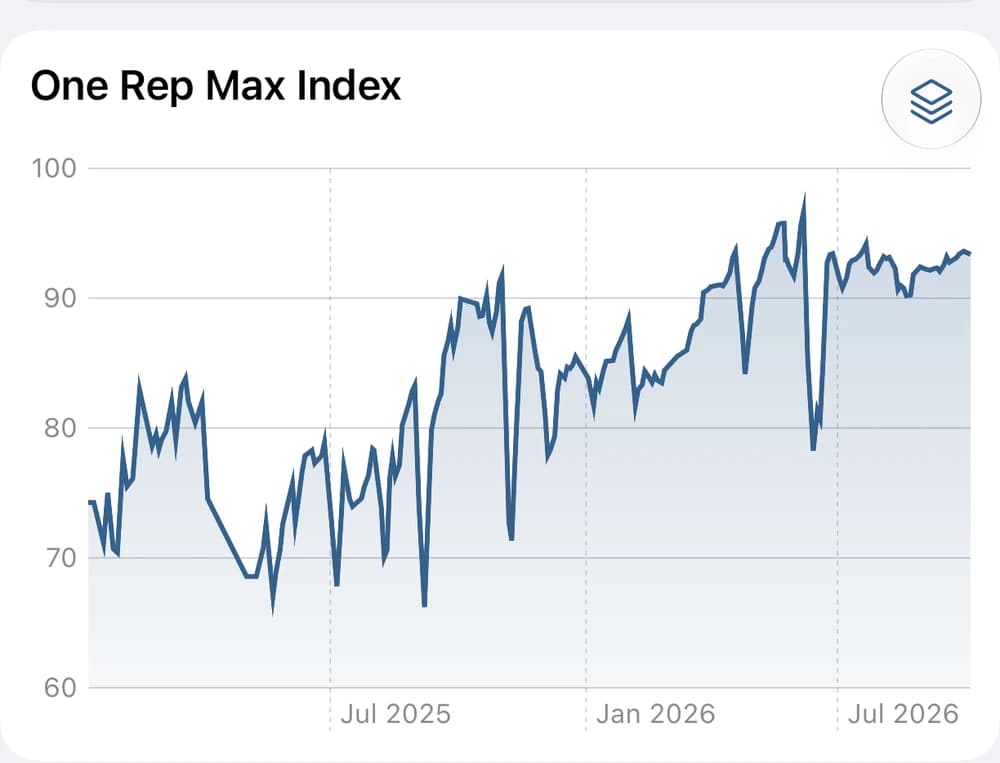
- 100 means matching your own best estimated performances, not lifting a certain weight or ranking against others.
- Check the individual exercises and completed sets behind a change before deciding what it means.
It is not a direct measurement of strength or fatigue. Lighter sessions, exercise mix, and older estimates fading out can move the index. New personal bests raise its references, so it need not keep climbing as you progress.
Review your training progressYour own bests are the reference.
An exercise’s latest session estimate of 90 kg against its all-time best of 100 kg contributes 90%. An estimate of 135 kg against a best of 150 kg also contributes 90%. The percentages are averaged, so a heavier lift does not dominate just because it uses more kilograms.
With equally recent estimates, each exercise has equal weight. Sets and muscle groups are not weighted individually. Exercises you have not trained are not counted as zero. An index of 90 does not mean you have lost 10% of your strength: easier sessions or sets stopped short of failure can produce lower estimates too.
Three lifts. One shared scale.
Suppose your best estimates are 150 kg for the squat, 100 kg for the bench press, and 80 kg for the row. Change the latest squat estimate to see how the average responds.
- Squat90%135 kg latest / 150 kg best
- Bench press90%90 kg latest / 100 kg best
- Row90%72 kg latest / 80 kg best
1RM Index90.0(90 + 90 + 90) / 3
Each lift counts equally here. Only the latest squat estimate changes.
These are illustrative estimated 1RMs, not prescribed lifting weights. All estimates have full recency weight here. In the app, the latest estimate carries forward until you train that exercise again or it fades out of memory.
Use the review to choose a next step.
The index is a review tool, not a load selector. Return to the previous sets for the exercise and apply your program’s progression rules. Weekly volume adds context about work completed, not a target to maximize.
Set intensity puts one set in context. The index brings exercise history together. Neither replaces your actual weights, reps, technique, and effort.
How set intensity worksGo deeper: which sets contribute?
An estimated 1RM is calculated from weight and completed reps, without requiring a maximum-single test. For each exercise, Strength Direct uses the best estimate from a session’s completed working and drop sets. Warm-ups and unfinished sets do not count.
Timed, cardio, and weight × distance exercises use separate metrics, not the 1RM Index. The exercise-group chart shows percentage change from each group’s first visible point, rather than the aggregate index level.
Go deeper: 1RM Memory and chart dates
In Profile, 1RM Memory lets you choose three months, six months, one year, or all history. With a finite window, an exercise’s latest estimate has full weight for the first two thirds of that window, then smoothly fades to zero at the cutoff.
With six-month memory, an estimate has full weight for four months and fades over the next two. It then drops out of the average; it is not treated as zero strength. With all history selected, estimates carry forward without fading.
Memory changes an estimate’s contribution, not its all-time best reference. The chart’s date selector changes the period you see, not the bests used for normalization. Points are calculated at workout dates; if no estimate remains in memory, there is no index point.
New all-time bests raise the references, so older index values can be rescaled as your history grows.
The dashed At failure line.
When you log reps in reserve (RIR), the dashed At failure line estimates what your sets might represent with those extra reps completed. It uses completed reps + RIR while keeping the same real personal-best references.
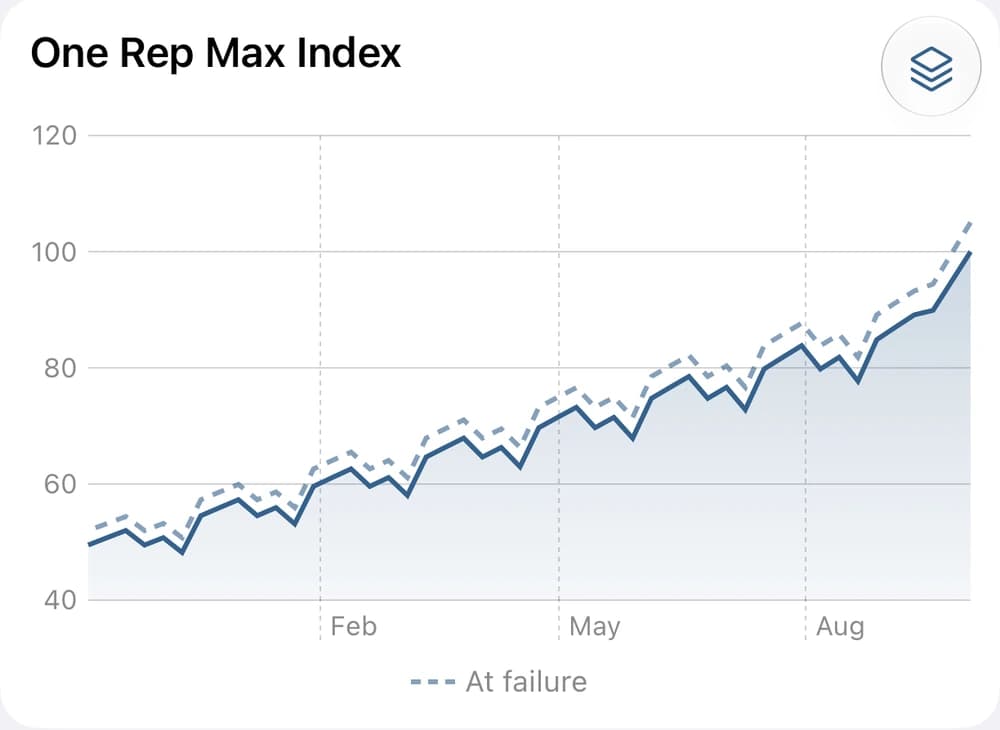
- The dashed line sits above the solid line here because these demonstration sets were logged with two reps in reserve.
- Toggle it on or off in the Profile tab → Workout Tracking → Track Reps In Reserve (RIR). Log RIR with your sets to give the overlay context.
For example, eight completed reps with RIR 2 uses ten reps for the dashed estimate. The actual result remains eight reps. RIR is your subjective estimate of reps left, so the gap is not measured unused strength.
It is an estimate of potential, not a lift you performed. It can exceed 100 and never changes the solid index, actual estimated 1RMs, or PRs. When there is no difference to show, the aggregate chart keeps just the solid line. Turning RIR off hides the overlay.